
Crypto Wallet Security in 2025: The Threats You Need to Know and How to Stay Safe
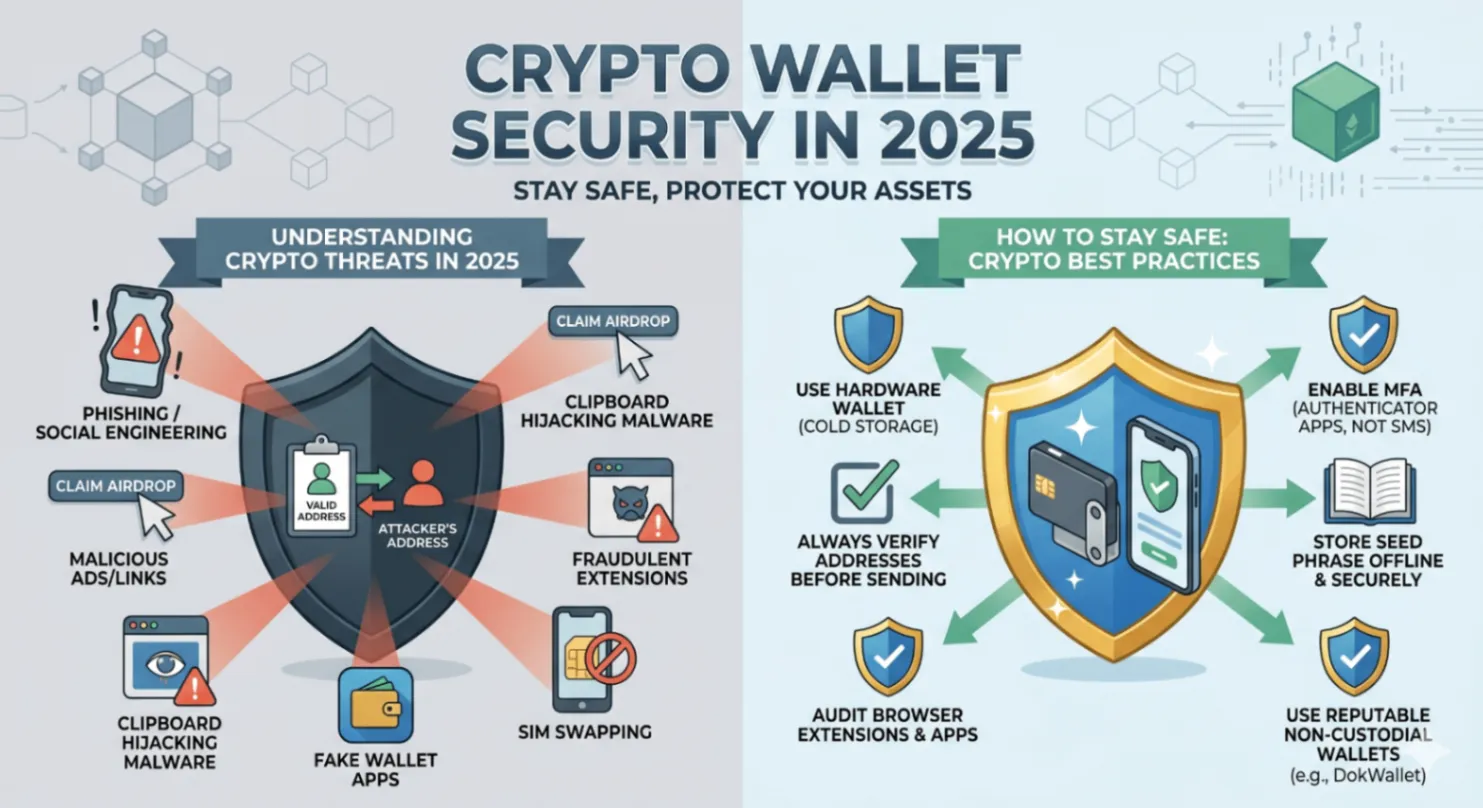
Crypto wallet security failures are almost always human failures. The blockchain itself has never been hacked — the losses come from compromised seed phrases, phishing attacks, and social engineering that targets the person holding the keys rather than the cryptographic system protecting them. Understanding the specific threats that exist is the first and most important step to avoiding them.
This guide covers the major attack vectors targeting crypto wallet users in 2025, explains exactly how each one works, and provides the practical countermeasures that close each threat. The rules are not technically complex — but they must be consistently followed.
The Threat Landscape in 2025
Crypto theft has become a sophisticated, professional, and well-resourced industry. The attackers targeting crypto wallet users are not opportunistic amateurs — they are organized groups that run phishing campaigns at scale, develop and deploy custom malware, conduct months-long social engineering operations, and launder stolen funds through complex on-chain routes. The scale of losses attributed to these attacks — running into billions of dollars annually across the ecosystem — reflects the level of investment attackers make in their methods.
The most important thing to understand about the threat landscape is that the vast majority of losses are preventable. The blockchain protocols themselves are not the weak link. Bitcoin has never been compromised at the protocol level. Ethereum's cryptography has never been broken. The losses consistently come from a small set of attack categories: seed phrases obtained through phishing or malware, funds sent to attacker-controlled addresses through clipboard hijacking, and victims manipulated into approving malicious transactions. Every one of these attack vectors has a known, practical defense.
The attack categories that account for the majority of losses are: phishing and social engineering targeting seed phrases, malware installed on victim devices, fake wallet applications, SIM swapping targeting exchange accounts, and smart contract attacks targeting DeFi users. Each requires a different defensive posture, but all share a common thread — the attacker is trying to obtain either your seed phrase or your signature on a transaction you did not intend to approve.
Threat 1 — Phishing Attacks
Phishing is the single largest source of crypto wallet losses. The most common variant is the fake wallet website — a site that looks pixel-perfect identical to a legitimate wallet provider's website, hosted at a domain name that differs from the real one by a single character or uses a plausible-looking alternative top-level domain. The site prompts users to "restore" their wallet by entering their seed phrase, which is immediately transmitted to the attacker. Funds are drained within seconds of the phrase being entered.
Social media and messaging platform phishing is equally prevalent. Fake support agents on Discord, Telegram, and Twitter actively target users who post questions about wallet issues. These agents will contact the user directly, present themselves as official support, and eventually ask for the seed phrase to "verify the wallet" or "restore access." There is no legitimate support workflow that requires a seed phrase — any request for it, from any source, is an attack without exception. Email phishing campaigns impersonate wallet brands and redirect users to credential-harvesting sites through urgent-sounding pretexts like "your wallet has been compromised" or "verify your account to avoid suspension."
The defense against phishing is simple but requires consistent discipline. Bookmark the official URLs of wallets and DeFi protocols you use, and navigate exclusively from those bookmarks — never from links in messages, emails, or search results. Never enter your seed phrase on any website for any reason. Understand that no legitimate wallet provider, support team, or protocol will ever ask for your seed phrase. Treat any request for it as a confirmed attack, regardless of how convincing the context appears.
Threat 2 — Clipboard Hijacking Malware
Clipboard hijacking malware is one of the most insidious attack vectors in crypto because it operates silently and exploits a routine behavior — copying and pasting addresses. The malware runs in the background on an infected device and monitors the clipboard for patterns that match cryptocurrency addresses. When it detects a copied crypto address, it silently replaces it with an attacker-controlled address. The victim pastes what they believe to be the correct recipient address and sends funds directly to the attacker.
This attack is particularly effective because crypto addresses are long, opaque strings that users have no ability to memorize. The natural workflow of copying an address from one source and pasting it into a send field is exactly what the malware exploits. Variants of this malware have been distributed through malicious software downloads, cracked software, and compromised package managers, making it a realistic threat for any Windows or macOS user who downloads software from unofficial sources.
The countermeasure is mandatory address verification after pasting. After pasting any crypto address into a send field, compare it character by character against the source address — at minimum the first six characters and the last six characters. Better still, verify a longer section of the middle of the address as well. Use QR codes for address sharing wherever possible — QR codes bypass the clipboard entirely and are not vulnerable to this attack. If your device is used for general-purpose software installation and web browsing, treat clipboard hijacking as a realistic risk that requires active mitigation on every transaction.
Threat 3 — Fake Wallet Apps
Malicious wallet applications that mimic legitimate wallets have appeared in both the Apple App Store and Google Play Store. These apps are designed to look and behave identically to the real wallet during setup — presenting a seed phrase display, asking you to confirm words in order, and appearing to create a wallet. The difference is that the seed phrase displayed is already known to the attacker. The moment you deposit funds to the address generated by the fake wallet, they are drained.
Some variants go further and prompt users to "import" an existing wallet by entering their seed phrase during setup, directly capturing it for the attacker. The visual design of these fake apps is often indistinguishable from the legitimate product. They use stolen logos, accurate screenshots, and occasionally even fake positive reviews to appear credible. Both major app stores have removed these applications repeatedly, but new variants appear regularly.
The protection is straightforward but must be followed without exception: download wallet applications only by navigating to the wallet provider's official website and following their link to the App Store or Play Store. Do not search for the wallet by name in the app store and select the first result — search results can be gamed. Verify the publisher name matches exactly. Check the number of reviews and download count — legitimate wallets from established providers have thousands of reviews, not dozens. If anything about the app feels unusual during setup, stop and verify before proceeding.
Threat 4 — Malware and Keyloggers
General-purpose malware poses a serious threat to crypto users beyond clipboard hijacking. Keyloggers capture every keystroke on an infected device, including seed phrases typed during wallet restoration, PINs, and passwords. If you type your seed phrase on an infected device for any reason — to restore a wallet, to store it in a text file, or to send it to yourself — a keylogger will capture it. Screen-capture malware takes periodic screenshots of the device, which can capture seed phrases displayed on screen or entered into fields.
Infostealers are a particularly dangerous category of malware that actively scans device storage for wallet files, browser extension data, and any text files that might contain seed phrases or private keys. These tools are commodity malware — available for purchase on criminal marketplaces and widely deployed through malicious software downloads, pirated games, and compromised websites. They exfiltrate their findings silently and automatically, often within seconds of infection.
The primary defense is to never store your seed phrase digitally in any form — no text file, no note in a password manager, no photo, no email to yourself. Write it on paper with a pen and store it in a physically secure location. For devices used for crypto operations, maintain reputable endpoint security software, keep the operating system and applications fully updated, and be highly selective about what software you install. Consider using a dedicated device for significant crypto transactions — one that is not used for general browsing or software installation.
Threat 5 — SIM Swapping
SIM swapping is an attack in which the attacker convinces a mobile carrier's customer service representative to transfer a victim's phone number to a SIM card controlled by the attacker. This is typically accomplished through social engineering — using personal information obtained from data breaches or social media to impersonate the account holder convincingly. Once the phone number is transferred, the attacker receives all calls and SMS messages destined for that number.
The primary target of SIM swapping in the crypto context is SMS-based two-factor authentication on exchange accounts. Many exchanges use SMS codes as a second factor, which means an attacker who controls your phone number can bypass 2FA and take over your exchange account. For non-custodial wallets like DokWallet, SIM swapping is less directly relevant — there is no 2FA to bypass because there is no account. Your funds are secured by the seed phrase alone, and no phone number is involved in accessing them. However, SIM swapping remains a serious threat to any exchange account holding crypto.
The countermeasures are: replace SMS-based 2FA on exchange accounts with an authenticator app such as Google Authenticator or Authy, which generates time-based codes locally and cannot be intercepted via SIM swap. Add a carrier PIN to your mobile account — most carriers offer this as a security feature that requires the PIN before any account changes can be made. Minimize the personal information associated with your carrier account, and use an email address not publicly associated with your identity for exchange registrations.
Threat 6 — Social Engineering and Impersonation
Social engineering attacks targeting crypto users range from crude mass-market scams to highly sophisticated long-term operations. The most visible category is fake giveaways — posts or videos featuring impersonations of well-known figures promising to double any crypto sent to a specified address. These scams are universally fraudulent. No legitimate giveaway requires you to send funds first. The "send 1 BTC, receive 2 BTC" premise is economically nonsensical and has been used to steal tens of millions of dollars from victims who either do not recognize the pattern or believe they have found an exception.
More sophisticated operations involve fake investment managers who approach targets on social media, messaging apps, or dating platforms. They build rapport over days or weeks, eventually present an investment opportunity with claimed exceptional returns, and convince the victim to deposit crypto into a platform they control. Initial "returns" may appear in the platform interface to build confidence. When the victim attempts a withdrawal, they are told additional fees or taxes must be paid first — and eventually the platform disappears entirely with all deposited funds. Romance scams follow the same structure with an added layer of manufactured emotional connection.
The universal rule that eliminates the vast majority of social engineering risk is: if it sounds too good to be true, it is a scam. No unsolicited investment opportunity offered through a messaging platform is legitimate. No celebrity giveaway is real. No stranger who contacts you with a lucrative crypto opportunity has your interests at heart. Apply the same skepticism to unsolicited crypto opportunities that you would apply to someone approaching you on the street with an offer to dramatically multiply your money.
Physical Threats
Physical security is a dimension of crypto wallet protection that is easy to overlook because it feels less technical. But a stolen device with an unlocked wallet app is a complete loss of funds, just as surely as a remote compromise. If your phone is stolen while the wallet app is open, or if the device lock can be bypassed, an attacker with physical access has everything they need. Similarly, a written seed phrase discovered by someone who knows what it is gives them complete and permanent access to your funds from any device, anywhere in the world.
Device security starts with a strong lock screen — a PIN of at least six digits, ideally combined with biometric authentication. Use the wallet app's own lock feature as a second layer: DokWallet supports a separate app PIN that is required to open the wallet even when the device itself is unlocked. This provides meaningful protection against scenarios where someone has brief access to your unlocked device — a common situation in social settings. Enable auto-lock on your device and on the wallet app to minimize the window of exposure after you set the device down.
Seed phrase physical security requires treating the written phrase with the same seriousness as physical cash of equivalent value. Store it in a location that is private, protected from the elements, and not accessible to people you do not completely trust. Do not photograph the seed phrase — cloud-synced photo libraries are accessible from multiple devices and platforms and are a common source of seed phrase compromise. Do not store it in a shared location. Consider a fireproof storage option if your holdings are significant. The threat is not only theft — accidental destruction of a single copy of a seed phrase can be as catastrophic as theft.
How DokWallet Protects You
DokWallet is built around a non-custodial architecture that removes the central point of failure that makes custodial wallets and exchanges attractive targets for large-scale attacks. Your private keys are generated on your device and never transmitted to any server. DokWallet's infrastructure holds no user keys and therefore has nothing that can be stolen through a server-side breach. This design fundamentally changes the threat model — the only path to your funds runs through your device and your seed phrase, not through a company's servers.
The open-source nature of DokWallet's codebase is a security feature in itself. The full source code is publicly available for review, which means security researchers can independently verify that private keys are handled correctly, that no data is transmitted to third-party servers, and that the wallet behaves exactly as documented. This is a higher standard of transparency than most wallet providers meet — and it means DokWallet's security claims do not have to be taken on faith.
Specific security features include: a separate wallet app PIN independent of device lock, screenshot prevention during seed phrase display to block accidental capture by screen recording or cloud backup services, and a clear address verification interface that shows the full destination address before any transaction is confirmed. WalletConnect integration ensures that when connecting to DeFi protocols, the private key never leaves the wallet — the DApp receives only the signed transaction output, never any key material.
Your Security Checklist
The following practices, applied consistently, close the vast majority of attack vectors that lead to crypto wallet losses. None of them require technical expertise — they require discipline and habit.
- Seed phrase: write it on paper with a pen, store it offline in a private and physically secure location, never photograph it, never type it into any digital device for any reason, and never share it with any person or service under any circumstances.
- Device security: use a strong PIN and biometric lock on your device, enable the wallet app's own lock feature, use reputable endpoint security software, and keep your operating system and apps fully updated.
- App downloads: only download wallet apps by following links from the wallet provider's official website; verify the publisher name and review count before installing.
- Address verification: always compare the pasted destination address against the source before confirming any transaction; verify at minimum the first and last six characters; use QR codes where possible to bypass the clipboard entirely.
- DApps and protocol URLs: bookmark official URLs and navigate only from those bookmarks; never click links to DeFi protocols in messages, emails, or search results; verify the URL in full before connecting your wallet.
- Support interactions: no legitimate wallet provider, exchange, or DeFi protocol will ever ask for your seed phrase for any reason; treat any such request as a confirmed attack regardless of context.
- Token approvals: regularly review and revoke unnecessary token approvals on chains where you use DeFi protocols; use tools like revoke.cash after completing DeFi interactions.
Conclusion
Crypto wallet security is not technically complex — it is behaviorally demanding. The cryptographic foundations of Bitcoin and Ethereum are robust; the vulnerabilities exist in human behavior and device hygiene. The rules are simple, well-established, and consistent across every type of attack: protect your seed phrase as the master key it is, verify every address and URL before taking action, download only from verified official sources, and maintain healthy skepticism toward anything unsolicited that involves your crypto.
Follow these rules consistently, and the vast majority of attack vectors are closed. The attackers who succeed are targeting the gaps between knowing the rules and following them — the moment of inattention when you paste an address without verifying it, the one time you click a link instead of using a bookmark, the rushed seed phrase backup that ends up in a photo. Consistent habit is the security model. With a non-custodial wallet like DokWallet providing the right architectural foundation, the rest depends on you.