
How to Pay with Crypto: A Practical Step-by-Step Guide
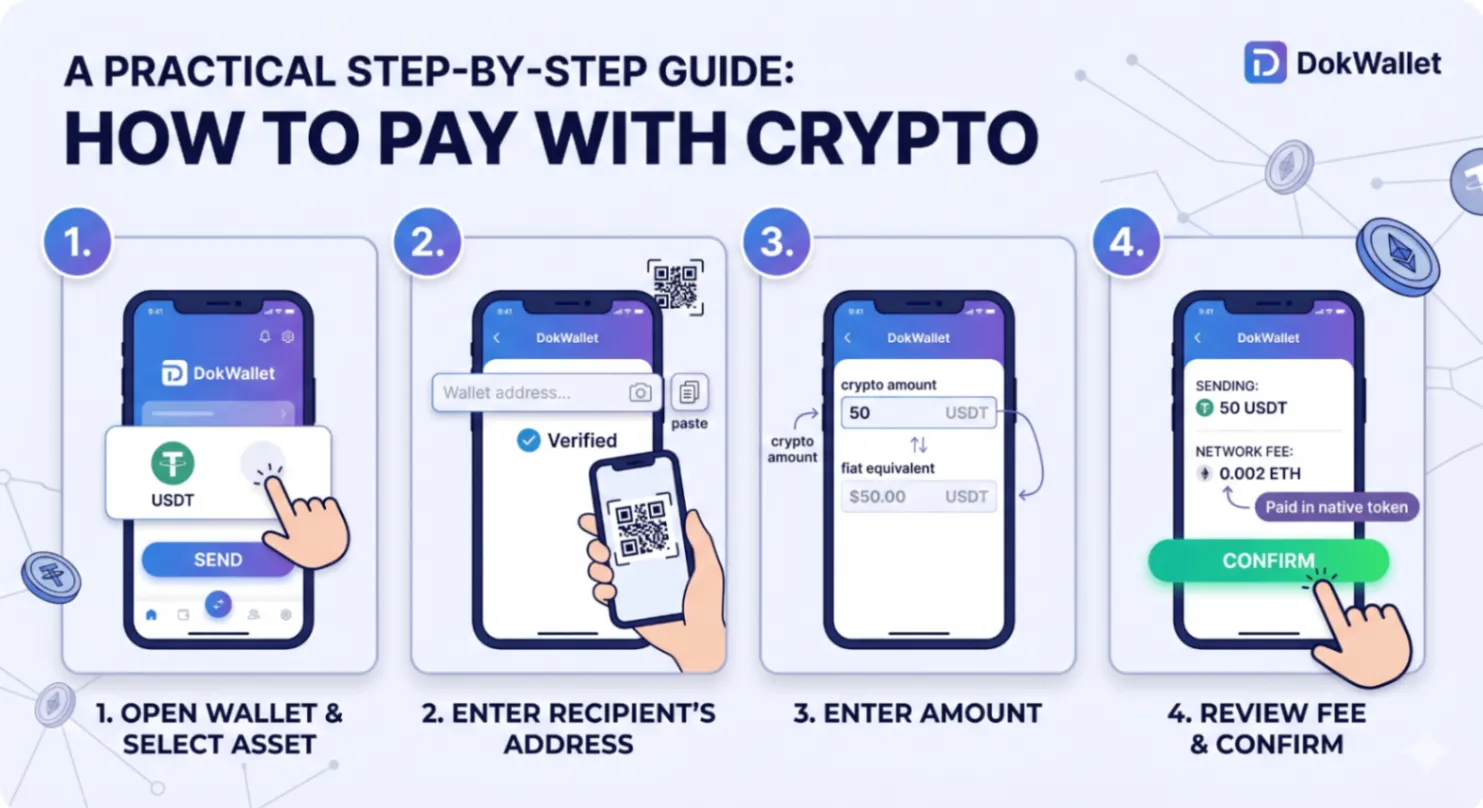
Paying with cryptocurrency is simpler than most people expect. The core mechanics — generating an address, sending a specified amount, waiting for confirmation — are straightforward once you understand them. The complexity that beginners typically encounter comes from not knowing what to expect at each step, not from the steps themselves being genuinely difficult.
This guide walks through how to pay with crypto from a practical standpoint: how to initiate a payment, how to choose the right asset and network, how to verify the transaction, and what to do when things do not go as expected.
Before You Pay: The Essentials
Have the Right Asset on the Right Network
This is the most important prerequisite. Cryptocurrency transactions are network-specific. If you need to pay in USDT on the Ethereum network, you need USDT on Ethereum — not USDT on BNB Chain, even though both are USDT. Sending the wrong asset or using the wrong network can result in funds that are lost or require complex recovery.
Before making a payment, confirm:
- Which cryptocurrency or stablecoin the recipient accepts
- Which blockchain network they are using
- That you have the correct asset on the correct network in your wallet
Have Enough for Fees
Every blockchain transaction requires a fee paid to network validators. On Ethereum, this fee is paid in ETH (even if you are sending a token like USDT). On BNB Chain, fees are paid in BNB. On Bitcoin, fees are paid in BTC.
Always ensure you have a small amount of the network's native token in addition to the amount you are sending. Running out of ETH while trying to send USDT, for example, will prevent the transaction from completing.
Step-by-Step: How to Send a Crypto Payment
Step 1 — Open Your Wallet and Select the Asset
In DokWallet, navigate to the Home screen and select the asset you want to send. Tap "Send" to open the send interface.
Step 2 — Enter the Recipient's Address
Paste the recipient's wallet address into the address field, or scan their QR code. Double-check the address before proceeding — ideally compare the first and last several characters. Cryptocurrency transactions are irreversible; sending to the wrong address means the funds are permanently gone.
Security Tip: Always verify addresses character by character, or use QR codes to eliminate transcription error. Clipboard-hijacking malware can replace copied addresses with attacker-controlled ones — check again after pasting.
Step 3 — Enter the Amount
Enter the amount you want to send. Most wallets allow you to enter either in the crypto amount or in a fiat equivalent (USD, EUR), with the other calculated automatically.
Step 4 — Review the Fee
The wallet will display the estimated network fee before you confirm. On networks with variable fees (Ethereum), you may have options to choose between slower and cheaper or faster and more expensive. For most payments, the standard fee is appropriate.
Step 5 — Confirm the Transaction
Review the full transaction summary: recipient address, amount, network, fee. Enter your wallet password or use biometric authentication to confirm. The transaction is signed locally and broadcast to the network.
Step 6 — Monitor Confirmation
The transaction will show as "Pending" until it is confirmed by the network. Confirmation times vary:
- Bitcoin: 10 to 60 minutes for one confirmation; most recipients require 1 to 3 confirmations
- Ethereum: typically under 5 minutes at standard fees
- BNB Chain, Polygon: typically under 30 seconds
Common Payment Scenarios
Paying a Freelancer or Business
Request their wallet address and preferred network. Agree on the currency (commonly USDT or USDC for stable value). Send the agreed amount and share the transaction hash as proof of payment. No bank, no processing time of 3 to 5 days.
Splitting a Payment Between Parties
Crypto has no concept of splitting a payment in the way that some payment apps do. Each sender must initiate their own transaction to the recipient's address for their share. For group payments, one person can collect and then send a single transaction.
Recurring Payments
There is no native "standing order" function in most crypto wallets — recurring payments must be initiated manually. Some DeFi protocols do support payment streaming, but this is an advanced use case outside the scope of basic wallet payments.
What to Do When a Payment Is Pending Too Long
On EVM networks (Ethereum, BNB Chain, Polygon), if a transaction is stuck pending due to low gas fees, DokWallet offers the ability to speed up or cancel the transaction. Speeding up re-submits the transaction with a higher gas fee, increasing priority with validators. Cancellation submits a zero-value transaction with the same nonce and a higher gas price, which can override the pending transaction.
Bitcoin pending transactions cannot be sped up within the wallet in the same way — but the transaction will eventually be confirmed once network congestion clears, as long as the fee was above the minimum threshold.
Verifying That a Payment Has Been Received
Every confirmed blockchain transaction has a permanent record on the public ledger. You can verify any transaction by taking the transaction hash (TXID) and entering it into the relevant blockchain explorer (Etherscan for Ethereum, BSCScan for BNB Chain, Blockchain.com for Bitcoin). The explorer shows the transaction details, confirmation status, and the current balance of the recipient's address.
Conclusion
Paying with crypto is fast, direct, and once you understand the mechanics, straightforward. The critical habits to develop are address verification (always), fee awareness (network-specific), and network consistency (matching the asset and chain to the recipient's requirements).
With a capable pay with crypto app like DokWallet, the interface handles the technical complexity, leaving you to focus on the transaction details that actually matter. The learning curve is a few successful transactions — after that, it becomes routine.