Best Mobile Crypto Wallet: What to Look For and Why DOK Wallet Qualifies
Mobile is now the primary way most people manage their crypto. The convenience of checking balances, sending payments, and swapping assets from your phone has made mobile crypto wallets the default choice for everyday users. But not every mobile wallet deserves the trust it asks for.
This guide explains what separates a genuinely good mobile crypto wallet from a mediocre one, the features that matter in daily use, and how DOK Wallet was designed to meet these standards.
Why the Mobile Crypto Wallet Choice Matters More Than People Realize
Choosing a mobile crypto wallet is not like choosing a note-taking app. A poor choice can mean loss of funds through insecure key storage, exposure of sensitive data through excessive permissions, or loss of access through a poorly designed recovery process. The stakes are real and the consequences are irreversible.
The best mobile crypto wallet is one that combines strong non-custodial key management with an interface that ordinary users can navigate confidently. Both elements are required. Strong security with a confusing interface leads to user mistakes. Great interface with weak security leads to asset loss.
For context on why non-custodial wallets specifically matter, read our guide to non-custodial crypto wallets.
Core Features of a Best-in-Class Mobile Crypto Wallet App
When evaluating a mobile crypto wallet app, these features should be non-negotiable:
- Non-custodial key management: your private keys never leave your device.
- Biometric authentication: Face ID, Touch ID, or fingerprint unlock.
- Multi-chain support: Bitcoin, Ethereum, and other major networks in one app.
- Clear seed phrase onboarding: guided and verified before any assets are added.
- Open-source code: independently auditable key management and transaction signing.
- Regular security updates: active maintenance against newly discovered vulnerabilities.
DOK Wallet as a Mobile Crypto Wallet App
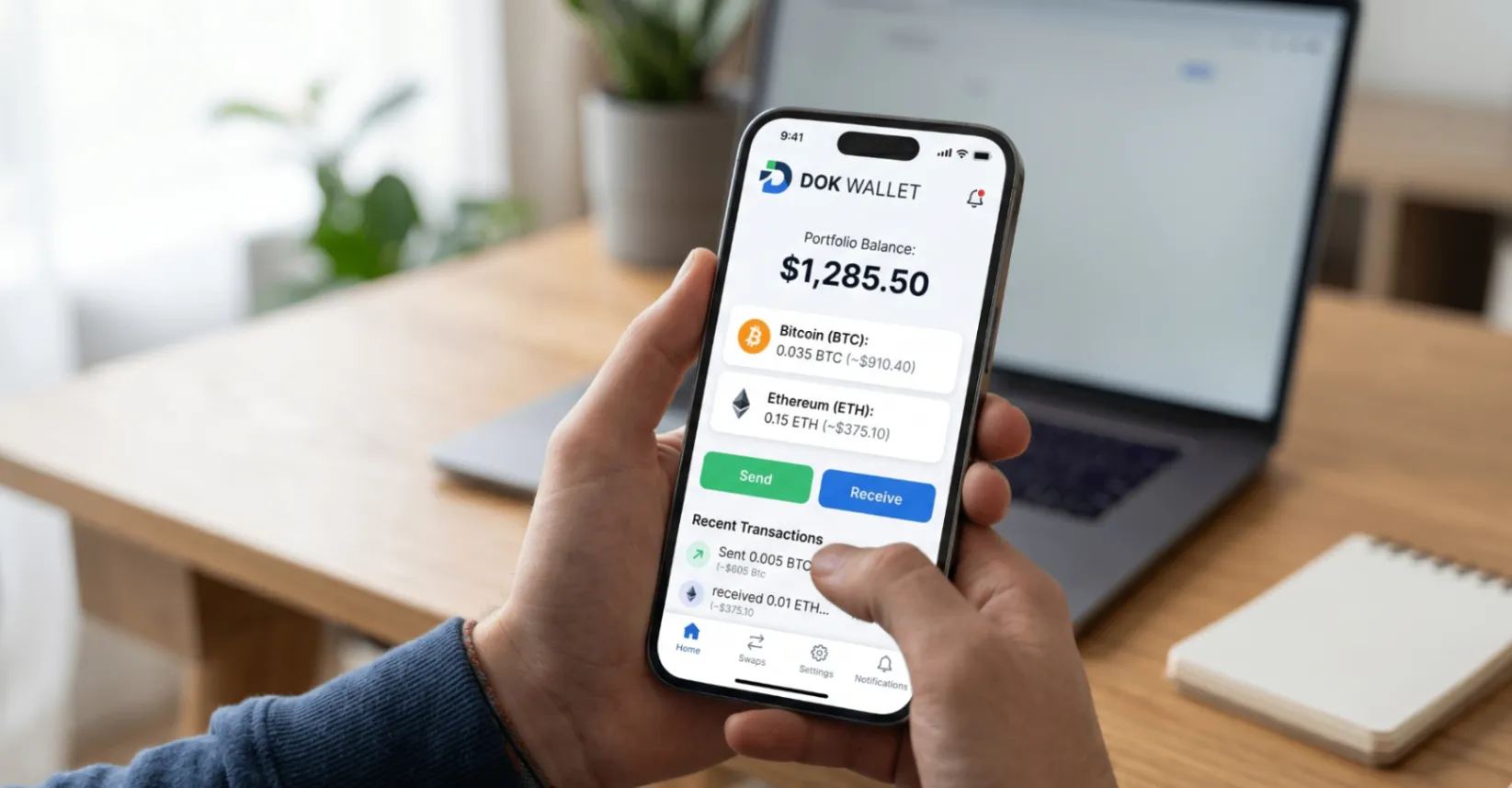
DOK Wallet is available on both iOS and Android and designed from the ground up as a mobile-first product. The interface opens directly to your portfolio dashboard, showing total value, individual coin balances, and recent transactions. Core actions, send, receive, and swap, are accessible from the main screen without navigating through submenus.
The onboarding process includes a guided seed phrase setup where users must verify their twelve-word phrase before the wallet is activated. This step cannot be skipped. It ensures that every DOK Wallet user has a functional backup from the first day of use.
See how DOK Wallet manages multiple chains in our multi-chain wallet guide.
Blockchain Wallet App Security on Mobile
Mobile devices introduce security considerations that desktop wallets do not face in the same way. Phone loss, screen shoulder-surfing, malicious apps with excessive permissions, and clipboard hijacking are all real threats to mobile crypto users.
DOK Wallet addresses these threats at several layers. Biometric authentication prevents unauthorized access if your phone is lost. The app blocks screenshots in sensitive screens, including seed phrase display. Clipboard operations for wallet addresses include timeout behaviour. The open-source codebase means no hidden network calls or data collection functions exist in the app.
DOK Wallet's open-source code can be reviewed at dokwallet.com/open-source.
Crypto Wallet iOS App: DOK Wallet on Apple Devices
iOS users benefit from Apple's security infrastructure, including the Secure Enclave chip that handles cryptographic operations in hardware-isolated memory. DOK Wallet integrates with iOS security features including Face ID and Touch ID authentication and uses secure storage APIs for key material.
The DOK Wallet iOS app is available on the App Store and receives regular updates. iOS-specific security considerations, including app sandboxing and permission controls, make the Apple ecosystem a strong home for a mobile crypto wallet.
For a guide specifically focused on iOS crypto wallet selection, read our crypto wallet iOS app guide.
Everyday Use: Sending, Receiving, and Swapping
The best measure of a mobile wallet is how it handles everyday actions under realistic conditions. Sending crypto in DOK Wallet requires three inputs: recipient address, asset, and amount. The app shows the network fee estimate before confirmation. A QR code scanner is built in for address entry. The process completes in under thirty seconds for most transactions.
Receiving is even simpler. Open receive, select the asset, and share your address or QR code. Swap functionality is built into the app for supported asset pairs, removing the need to transfer to an exchange for simple conversions.
Frequently Asked Questions
What should I look for in a mobile crypto wallet?
The essential criteria are: non-custodial key management so your keys never leave your device, open-source code for independent security verification, multi-chain support, biometric authentication, guided seed phrase onboarding, and regular security updates.
Does DOK Wallet support biometric authentication?
Yes. DOK Wallet supports Face ID, Touch ID, and fingerprint authentication on both iOS and Android. Biometric authentication is required every time the app is opened, providing a strong daily security layer.
Is DOK Wallet available on both iOS and Android?
Yes. DOK Wallet is available on the Apple App Store for iOS and Google Play for Android, with feature parity across both platforms.
What is the Secure Enclave and why does it matter for a crypto wallet?
The Secure Enclave is a hardware security chip on Apple devices that handles cryptographic operations in hardware-isolated memory. DOK Wallet's iOS app stores key material using iOS Keychain APIs that leverage the Secure Enclave, providing hardware-backed protection for your private keys.
Does DOK Wallet block screenshots on sensitive screens?
Yes. DOK Wallet blocks screenshot functionality on the seed phrase display screen to reduce the risk of accidental capture. This prevents your recovery phrase from being stored unintentionally in your photo library.
Can I recover my DOK Wallet on a new phone?
Yes. Install DOK Wallet on any compatible device, choose the import option, and enter your seed phrase. All your addresses and assets across every supported chain will be immediately accessible on the new device.
Final Thoughts
The best mobile crypto wallet is one you actually use confidently every day, backed by security architecture that holds up under real-world conditions. DOK Wallet achieves both: a clean, fast mobile interface built on a non-custodial, open-source foundation.
Download DOK Wallet for iOS and Android at dokwallet.com.